One table is rarely the whole story. Real data is relational — customers ↔ orders, employees ↔ managers — joined on keys.ONdefines how rows match;WHEREdefines which joined rows survive.
Most datasets are relational — information spread across tables connected by common fields. To analyze behavior, sales, or activity you must combine tables. This chapter covers JOINS with ON and aliases.
CREATE TABLE customers (
  customer_id     INT PRIMARY KEY,
  name            VARCHAR(50) NOT NULL,
  email           VARCHAR(120),
  city            VARCHAR(60),
  signup_at_utc   DATETIME
);
CREATE TABLE orders (
  order_id        INT PRIMARY KEY, customer_id INT,
  order_code      VARCHAR(10) NOT NULL,
  status          VARCHAR(20) NOT NULL,
  total_amount    DECIMAL(10,2) NOT NULL,
  placed_at_utc   DATETIME NOT NULL,
  INDEX idx_orders_customer_id (customer_id)
);
INSERT INTO customers (customer_id, name, email, city, signup_at_utc) VALUES
(101, 'Aisha',  'aisha@demo.com',  'Delhi',     '2026-01-01 10:00:00'),
(102, 'Rohan',  'rohan@demo.com',  'Mumbai',    '2026-01-02 11:00:00'),
(103, 'Meera',  'meera@demo.com',  NULL,        '2026-01-03 12:00:00'),
(104, 'Arjun',  'arjun@demo.com',  'Delhi',     '2026-01-04 13:00:00'),
(106, 'Neha',   'neha@demo.com',   'Pune',      '2026-01-05 09:30:00'),
(107, 'Ishaan', 'ishaan@demo.com', 'Bengaluru', '2026-01-06 18:10:00'),
(108, 'Riya',   NULL,              'Delhi',     '2026-01-07 07:45:00'),
(109, 'Aisha',  'aisha2@demo.com', 'Jaipur',    '2026-01-08 20:00:00');
INSERT INTO orders (order_id, customer_id, order_code, status, total_amount, placed_at_utc) VALUES
(1, 101, 'A', 'PAID',      499.00, '2026-01-10 10:00:00'),
(2, 102, 'B', 'PAID',      299.00, '2026-01-10 11:00:00'),
(3, 105, 'C', 'PAID',      199.00, '2026-01-10 12:00:00'),
(4, 101, 'D', 'CANCELLED', 999.00, '2026-01-11 09:00:00'),
(5, 106, 'E', 'PAID',      799.00, '2026-01-11 10:30:00'),
(6, 106, 'F', 'PENDING',   149.00, '2026-01-12 08:20:00'),
(7, NULL,'G', 'PAID',      249.00, '2026-01-12 09:10:00'),
(8, 999, 'H', 'PAID',      129.00, '2026-01-12 15:40:00');
CREATE TABLE customers (
customer_id INT PRIMARY KEY,
name VARCHAR(50) NOT NULL,
email VARCHAR(120),
city VARCHAR(60),
signup_at_utc TIMESTAMP
);
CREATE TABLE orders (
order_id INT PRIMARY KEY, customer_id INT,
order_code VARCHAR(10) NOT NULL,
status VARCHAR(20) NOT NULL,
total_amount DECIMAL(10,2) NOT NULL,
placed_at_utc TIMESTAMP NOT NULL
);
CREATE INDEX idx_orders_customer_id ON orders(customer_id);
-- same INSERTs (DATETIME → TIMESTAMP)RIGHT JOIN returns all rows from the right table (orders), plus matching left rows (customers). No match → left columns become NULL.
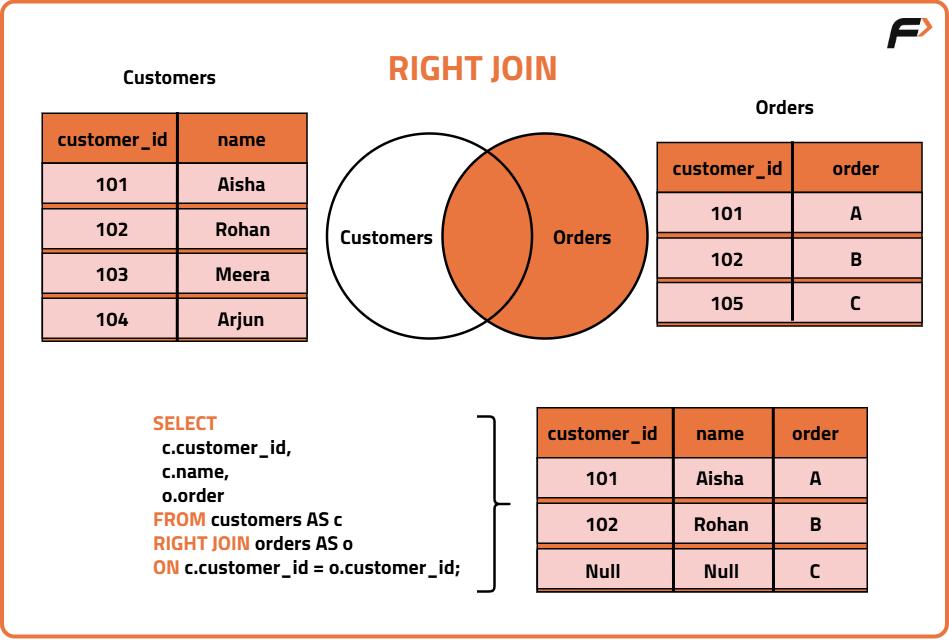
SELECT o.order_id, o.order_code, o.status, o.total_amount, o.customer_id,
       c.name AS customer_name
FROM customers AS c
RIGHT JOIN orders AS o ON c.customer_id = o.customer_id
ORDER BY o.order_id;
SELECT o.order_id, o.order_code, o.status, o.total_amount, o.customer_id,
c.name AS customer_name
FROM customers AS c
RIGHT JOIN orders AS o ON c.customer_id = o.customer_id
ORDER BY o.order_id;| order_id | order_code | status | total_amount | customer_id | customer_name |
|---|---|---|---|---|---|
| 1 | A | PAID | 499.00 | 101 | Aisha |
| 2 | B | PAID | 299.00 | 102 | Rohan |
| 3 | C | PAID | 199.00 | 105 | NULL |
| 4 | D | CANCELLED | 999.00 | 101 | Aisha |
| 5 | E | PAID | 799.00 | 106 | Neha |
| 6 | F | PENDING | 149.00 | 106 | Neha |
| 7 | G | PAID | 249.00 | NULL | NULL |
| 8 | H | PAID | 129.00 | 999 | NULL |
Orders 3/8 have unknown customers, order 7 has NULL — all still appear because orders is preserved.
SELECT o.order_id, o.order_code, o.status, o.total_amount,
       c.name AS customer_name, c.city
FROM customers AS c
RIGHT JOIN orders AS o ON c.customer_id = o.customer_id
WHERE o.status = 'PAID'
ORDER BY o.order_id;
SELECT o.order_id, o.order_code, o.status, o.total_amount,
c.name AS customer_name, c.city
FROM customers AS c
RIGHT JOIN orders AS o ON c.customer_id = o.customer_id
WHERE o.status = 'PAID'
ORDER BY o.order_id;| order_id | order_code | status | total_amount | customer_name | city |
|---|---|---|---|---|---|
| 1 | A | PAID | 499.00 | Aisha | Delhi |
| 2 | B | PAID | 299.00 | Rohan | Mumbai |
| 3 | C | PAID | 199.00 | NULL | NULL |
| 5 | E | PAID | 799.00 | Neha | Pune |
| 7 | G | PAID | 249.00 | NULL | NULL |
| 8 | H | PAID | 129.00 | NULL | NULL |
WHERE o.status='PAID' filters after the join but preserves unmatched orders (still PAID).
SELECT o.order_code, c.customer_id, c.city
FROM customers AS c
RIGHT JOIN orders AS o ON c.customer_id = o.customer_id
                    AND c.city = 'Delhi';
SELECT o.order_code, c.customer_id, c.city
FROM customers AS c
RIGHT JOIN orders AS o ON c.customer_id = o.customer_id
AND c.city = 'Delhi';| order_code | customer_id | city |
|---|---|---|
| A | 101 | Delhi |
| B | NULL | NULL |
| C | NULL | NULL |
| D | 101 | Delhi |
| E | NULL | NULL |
| F | NULL | NULL |
| G | NULL | NULL |
| H | NULL | NULL |
c.city='Delhi' in ON means match only if customer is Delhi — otherwise left columns become NULL, but right rows still survive.
| Aspect | ON (Join Condition) | WHERE (Filter Condition) |
|---|---|---|
| When | During matching | After join result |
| Purpose | Defines how rows match | Defines which joined rows remain |
| Best for | Keeping all left/right rows but controlling matches | Filtering final output |
LEFT JOIN keeps all left table (customers) rows; no right match → right columns NULL.
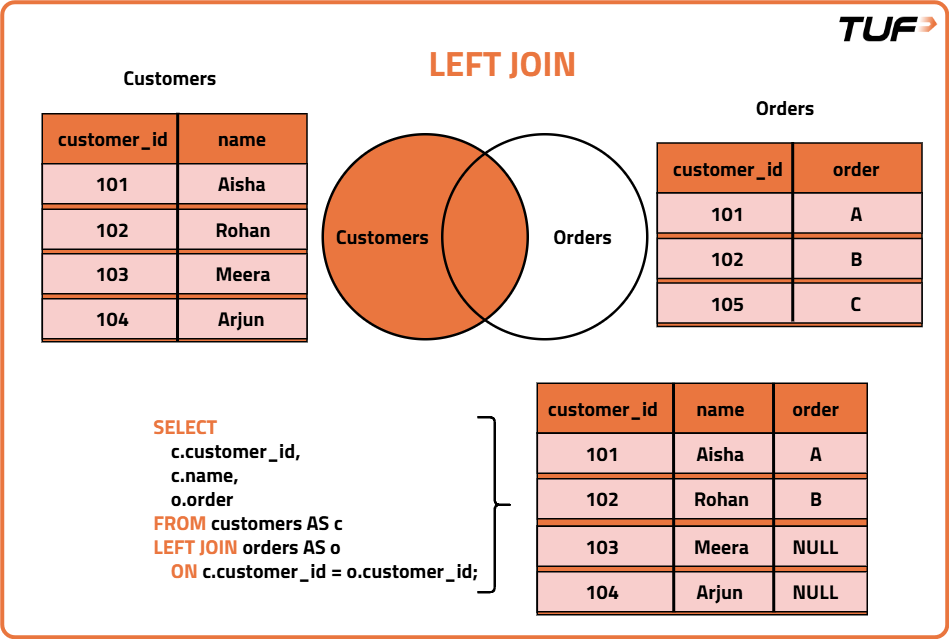
SELECT c.customer_id, c.name, o.order_id, o.order_code
FROM customers AS c
LEFT JOIN orders AS o ON o.customer_id = c.customer_id;
SELECT c.customer_id, c.name, o.order_id, o.order_code
FROM customers AS c
LEFT JOIN orders AS o ON o.customer_id = c.customer_id;| customer_id | name | order_id | order_code |
|---|---|---|---|
| 101 | Aisha | 1 | A |
| 101 | Aisha | 4 | D |
| 102 | Rohan | 2 | B |
| 103 | Meera | NULL | NULL |
| 104 | Arjun | NULL | NULL |
| 106 | Neha | 5 | E |
| 106 | Neha | 6 | F |
| 107 | Ishaan | NULL | NULL |
| 108 | Riya | NULL | NULL |
| 109 | Aisha | NULL | NULL |
SELECT c.customer_id, c.name, o.order_id, o.order_code
FROM customers AS c
LEFT JOIN orders AS o ON o.customer_id = c.customer_id
WHERE o.order_id IS NULL;
SELECT c.customer_id, c.name, o.order_id, o.order_code
FROM customers AS c
LEFT JOIN orders AS o ON o.customer_id = c.customer_id
WHERE o.order_id IS NULL;| customer_id | name | order_id | order_code |
|---|---|---|---|
| 103 | Meera | NULL | NULL |
| 104 | Arjun | NULL | NULL |
| 107 | Ishaan | NULL | NULL |
| 108 | Riya | NULL | NULL |
| 109 | Aisha | NULL | NULL |
After LEFT JOIN, unmatched customers have o.order_id IS NULL — filter to find them.
INNER JOIN keeps only rows where both sides match.
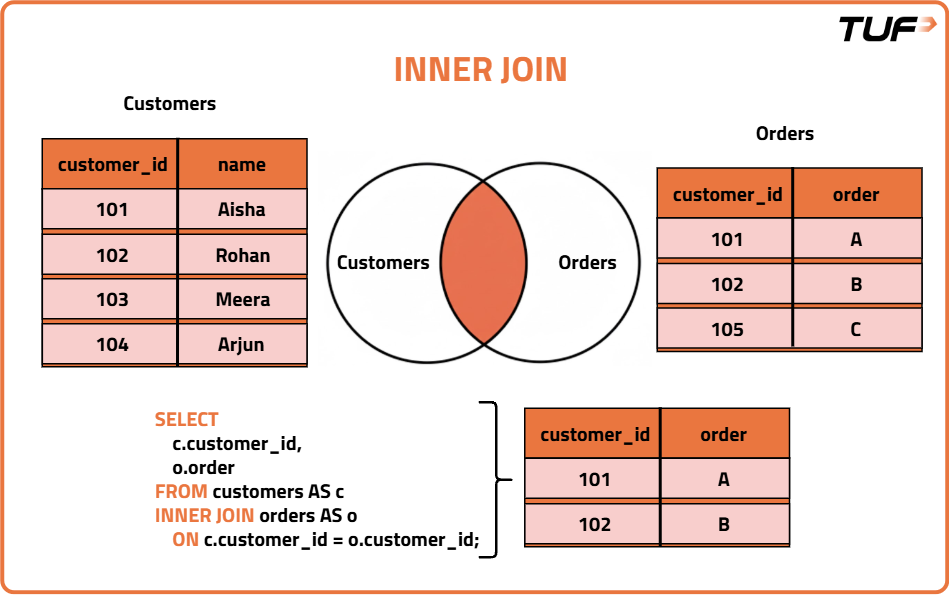
SELECT c.customer_id, c.name, COUNT(*) AS orders_count
FROM customers AS c
INNER JOIN orders AS o ON c.customer_id = o.customer_id
GROUP BY c.customer_id, c.name;
SELECT c.customer_id, c.name, COUNT(*) AS orders_count
FROM customers AS c
INNER JOIN orders AS o ON c.customer_id = o.customer_id
GROUP BY c.customer_id, c.name;| customer_id | name | orders_count |
|---|---|---|
| 101 | Aisha | 2 |
| 102 | Rohan | 1 |
| 106 | Neha | 2 |
SELECT c.customer_id, c.name, SUM(o.total_amount) AS revenue
FROM customers AS c
INNER JOIN orders AS o ON c.customer_id = o.customer_id
GROUP BY c.customer_id, c.name;
SELECT c.customer_id, c.name, SUM(o.total_amount) AS revenue
FROM customers AS c
INNER JOIN orders AS o ON c.customer_id = o.customer_id
GROUP BY c.customer_id, c.name;| customer_id | name | revenue |
|---|---|---|
| 101 | Aisha | 1498.00 |
| 102 | Rohan | 299.00 |
| 106 | Neha | 948.00 |
Unmatched orders (105, 999, NULL) are ignored.
| student_id | name |
|---|---|
| 1 | ASHA |
| 2 | RAVI |
| 3 | NEHA |
| NULL | RAJ |
| student_id | amount |
|---|---|
| 1 | 500 |
| 2 | 700 |
| 4 | 800 |
-- MySQL: emulate with LEFT + UNION + RIGHT
SELECT s.student_id, s.name, p.amount
FROM students AS s LEFT JOIN payments AS p ON p.student_id = s.student_id
UNION
SELECT p.student_id, s.name, p.amount
FROM students AS s RIGHT JOIN payments AS p ON p.student_id = s.student_id
WHERE s.student_id IS NULL;
SELECT COALESCE(s.student_id, p.student_id) AS student_id, s.name, p.amount
FROM students AS s
FULL OUTER JOIN payments AS p ON p.student_id = s.student_id
ORDER BY student_id;| student_id | name | amount |
|---|---|---|
| 1 | ASHA | 500 |
| 2 | RAVI | 700 |
| 3 | NEHA | NULL |
| NULL | RAJ | NULL |
| 4 | NULL | 800 |
Every row from left pairs with every row from right → m × n rows. No ON needed. Useful for combinations (customer × coupon, dates × products).
SELECT COUNT(*) FROM customers AS c CROSS JOIN orders AS o;SELECT COUNT(*) FROM customers AS c CROSS JOIN orders AS o;| COUNT(*) |
|---|
| 64 |
8 customers × 8 orders = 64. Grows fast — use carefully.
SELECT c.customer_id, c.name, o.order_code, o.status
FROM customers AS c, orders AS o
WHERE c.customer_id = o.customer_id;
SELECT c.customer_id, c.name, o.order_code, o.status
FROM customers AS c, orders AS o
WHERE c.customer_id = o.customer_id;Comma forms Cartesian product, then WHERE filters to matches — equivalent to INNER JOIN … ON. Without WHERE, it becomes a CROSS JOIN.
| customer_id | name | order_code | status |
|---|---|---|---|
| 101 | Aisha | A | PAID |
| 102 | Rohan | B | PAID |
| 101 | Aisha | D | CANCELLED |
| 106 | Neha | E | PAID |
| 106 | Neha | F | PENDING |
| emp_id | emp_name | manager_id |
|---|---|---|
| 1 | Kriti | NULL |
| 2 | Siddhant | 1 |
| 3 | Anamika | 1 |
| 4 | Utkarsh | 2 |
| 5 | Ronit | 2 |
| 6 | Shivi | 3 |
SELECT e.emp_name AS employee, m.emp_name AS manager
FROM employees AS e
JOIN employees AS m ON e.manager_id = m.emp_id
ORDER BY e.emp_id;
SELECT e.emp_name AS employee, m.emp_name AS manager
FROM employees AS e
JOIN employees AS m ON e.manager_id = m.emp_id
ORDER BY e.emp_id;| employee | manager |
|---|---|
| Siddhant | Kriti |
| Anamika | Kriti |
| Utkarsh | Siddhant |
| Ronit | Siddhant |
| Shivi | Anamika |
Kriti excluded — manager_id IS NULL.
SELECT m.emp_name AS manager, COUNT(*) AS direct_reports
FROM employees AS e
JOIN employees AS m ON e.manager_id = m.emp_id
GROUP BY m.emp_name
ORDER BY m.emp_name;
SELECT m.emp_name AS manager, COUNT(*) AS direct_reports
FROM employees AS e
JOIN employees AS m ON e.manager_id = m.emp_id
GROUP BY m.emp_name
ORDER BY m.emp_name;| manager | direct_reports |
|---|---|
| Anamika | 1 |
| Kriti | 2 |
| Siddhant | 2 |
Matches all columns with the same name in both tables — no ON needed. Risky: adding a same-named column later silently changes the join.
| customer_id | tier |
|---|---|
| 101 | GOLD |
| 102 | SILVER |
| 104 | BRONZE |
| 106 | GOLD |
| 201 | PINNACLE |
SELECT c.customer_id, cl.tier
FROM customers AS c
NATURAL JOIN customer_loyalty AS cl
ORDER BY c.customer_id;
SELECT c.customer_id, cl.tier
FROM customers AS c
NATURAL JOIN customer_loyalty AS cl
ORDER BY c.customer_id;| customer_id | tier |
|---|---|
| 101 | GOLD |
| 102 | SILVER |
| 104 | BRONZE |
| 106 | GOLD |
ON vs WHERE in an OUTER JOIN — which is correct?
RIGHT JOIN → all orders, NULL where no customer; WHERE o.status='PAID' after join; AND c.city='Delhi' in ON → NULL fill not filter
LEFT JOIN → all customers; WHERE o.order_id IS NULL → never ordered (Meera, Arjun, Ishaan, Riya, Aisha Jaipur)
INNER JOIN → only matches; COUNT/SUM per customer → 101:2/1498, 102:1/299, 106:2/948
FULL OUTER → all from both; MySQL: LEFT UNION RIGHT; pgsql: FULL OUTER JOIN + COALESCE
CROSS JOIN → 8×8=64, no ON; IMPLICIT (comma + WHERE) = INNER, forget WHERE → CROSS
SELF JOIN → e JOIN m ON e.manager_id=m.emp_id; NATURAL JOIN → auto on same-named cols (risky)
ON = during matching (preserves outer); WHERE = after join (filters result)
Primary sources: MySQL JOIN · Postgres Joins. Ask me anything that's unclear.
Questions? Ask your agent — you can follow up on any concept, quiz answer, or how this applies to a specific query. Review the SQL glossary or syntax quick reference for a compressed overview.