Raw rows rarely answer business questions. You summarize: totals, averages, minima, maxima, and counts  grouped meaningfully.GROUP BY+ aggregates +HAVINGturn thousands of rows into one report.
After learning to read and filter individual rows, the next step is summarizing. Monthly sales, student performance, employee productivity  you rarely inspect rows one by one. You combine them, calculate totals, compute averages, and group similar items to see the bigger picture.
This lesson uses two tables  employees and registrations  to learn SUM, AVG, MIN, MAX, COUNT, GROUP BY, and HAVING.
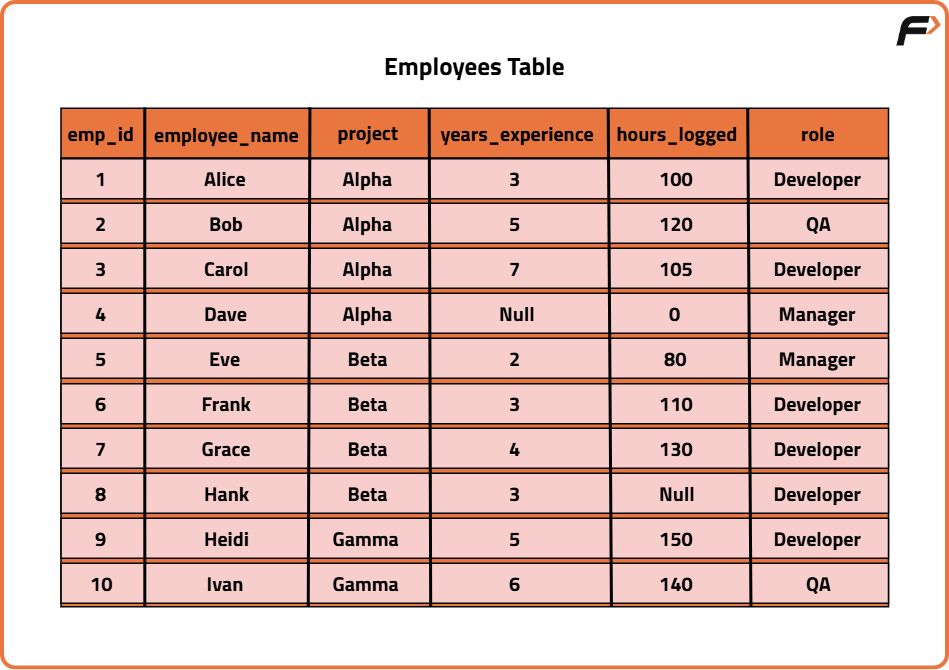
employeesCREATE TABLE employees (
emp_id INT PRIMARY KEY,
employee_name VARCHAR(50) NOT NULL,
project VARCHAR(20) NOT NULL,
years_experience DECIMAL(4,1) NULL, hours_logged INT NULL,
role VARCHAR(20) NULL,
INDEX idx_project (project)
);
INSERT INTO employees (emp_id, employee_name, project, years_experience, hours_logged, role) VALUES
(1, 'Alice', 'Alpha', 3.0, 100, 'Developer'),
(2, 'Bob', 'Alpha', 5.0, 120, 'QA'),
(3, 'Carol', 'Alpha', 7.0, 105, 'Developer'),
(4, 'Dave', 'Alpha', NULL, 0, 'Manager'),
(5, 'Eve', 'Beta', 2.0, 80, 'Manager'),
(6, 'Frank', 'Beta', 3.0, 110, 'Developer'),
(7, 'Grace', 'Beta', 4.0, 130, 'Developer'),
(8, 'Hank', 'Beta', 3.0, NULL, 'Developer'),
(9, 'Heidi', 'Gamma', 5.0, 150, 'Developer'),
(10, 'Ivan', 'Gamma', 6.0, 140, 'QA');CREATE TABLE employees (
emp_id INT PRIMARY KEY,
employee_name VARCHAR(50) NOT NULL,
project VARCHAR(20) NOT NULL,
years_experience NUMERIC(4,1), hours_logged INT,
role VARCHAR(20)
);
CREATE INDEX idx_project ON employees (project);
INSERT INTO employees (emp_id, employee_name, project, years_experience, hours_logged, role) VALUES
(1, 'Alice', 'Alpha', 3.0, 100, 'Developer'),
(2, 'Bob', 'Alpha', 5.0, 120, 'QA'),
(3, 'Carol', 'Alpha', 7.0, 105, 'Developer'),
(4, 'Dave', 'Alpha', NULL, 0, 'Manager'),
(5, 'Eve', 'Beta', 2.0, 80, 'Manager'),
(6, 'Frank', 'Beta', 3.0, 110, 'Developer'),
(7, 'Grace', 'Beta', 4.0, 130, 'Developer'),
(8, 'Hank', 'Beta', 3.0, NULL, 'Developer'),
(9, 'Heidi', 'Gamma', 5.0, 150, 'Developer'),
(10, 'Ivan', 'Gamma', 6.0, 140, 'QA');| emp_id | employee_name | project | years_experience | hours_logged | role |
|---|---|---|---|---|---|
| 1 | Alice | Alpha | 3.0 | 100 | Developer |
| 2 | Bob | Alpha | 5.0 | 120 | QA |
| 3 | Carol | Alpha | 7.0 | 105 | Developer |
| 4 | Dave | Alpha | NULL | 0 | Manager |
| 5 | Eve | Beta | 2.0 | 80 | Manager |
| 6 | Frank | Beta | 3.0 | 110 | Developer |
| 7 | Grace | Beta | 4.0 | 130 | Developer |
| 8 | Hank | Beta | 3.0 | NULL | Developer |
| 9 | Heidi | Gamma | 5.0 | 150 | Developer |
| 10 | Ivan | Gamma | 6.0 | 140 | QA |
GROUP BY divides rows into groups based on one or more columns; aggregates then operate within each group.
Example: List all unique projects.
SELECT project
FROM employees
GROUP BY project;
SELECT project
FROM employees
GROUP BY project;This merges duplicate project names  one row per group  even with no aggregate:
| project |
|---|
| Alpha |
| Beta |
| Gamma |
Use-case: distinct projects in the company.
Grouping by multiple columns  project + role (7 distinct combinations):
SELECT project, role
FROM employees
GROUP BY project, role;
SELECT project, role
FROM employees
GROUP BY project, role;| project | role |
|---|---|
| Alpha | Developer |
| Alpha | Manager |
| Alpha | QA |
| Beta | Developer |
| Beta | Manager |
| Gamma | Developer |
| Gamma | QA |
SQL is declarative  you say what, not how. Internally the engine follows a logical order (different from written order):
This explains why you cannot use an aggregate in WHERE  it hasn't been computed yet.
MIN() returns the smallest value, MAX() the largest  NULL is ignored.
Example: Minimum and maximum experience per project.
SELECT project,
       MIN(years_experience) AS min_experience,
       MAX(years_experience) AS max_experience
FROM employees
GROUP BY project;
SELECT project,
MIN(years_experience) AS min_experience,
MAX(years_experience) AS max_experience
FROM employees
GROUP BY project;| project | min_experience | max_experience |
|---|---|---|
| Alpha | 3 | 7 |
| Beta | 2 | 4 |
| Gamma | 5 | 6 |
Use-case: junior vs senior mix per project.
SUM() totals a numeric column, AVG() computes the mean. Both ignore NULL.
Example: Total hours and average experience per project.
SELECT project,
       SUM(hours_logged) AS total_hours,
       AVG(years_experience) AS avg_experience
FROM employees
GROUP BY project;
SELECT project,
SUM(hours_logged) AS total_hours,
AVG(years_experience) AS avg_experience
FROM employees
GROUP BY project;| project | total_hours | avg_experience |
|---|---|---|
| Alpha | 325 | 5 |
| Beta | 320 | 3 |
| Gamma | 290 | 5.5 |
SUM(hours_logged) = team effort; AVG(years_experience) = team maturity. Alpha: 100+120+105+0=325; Beta: 80+110+130+NULL→320; NULL is skipped.
AVG(years_experience) for Alpha is 5  why not 3.75?
HAVING filters groups after aggregation, like WHERE filters rows before aggregation. Use HAVING when the condition depends on an aggregate.
Example: Projects with total hours > 300.
SELECT project,
       SUM(hours_logged) AS total_hours
FROM employees
GROUP BY project
HAVING SUM(hours_logged) > 300;
SELECT project,
SUM(hours_logged) AS total_hours
FROM employees
GROUP BY project
HAVING SUM(hours_logged) > 300;| project | total_hours |
|---|---|
| Alpha | 325 |
| Beta | 320 |
Gamma (290) is filtered out  WHERE could not do this because total_hours didn't exist yet.
| Clause | When | Operates on |
|---|---|---|
WHERE | Before grouping | Individual rows |
HAVING | After grouping | Groups / aggregates |
Counting seems simple  “how many?† but COUNT() behaves differently based on what you count and whether NULL or duplicates exist. We use a second table.
CREATE TABLE registrations (
  reg_id      INT PRIMARY KEY,
  user_name   VARCHAR(50) NULL,
  email       VARCHAR(120) NULL,
  event       VARCHAR(50) NOT NULL,
  ticket_type ENUM('Free','Paid') NOT NULL,
  referrer    VARCHAR(50) NULL,
  INDEX idx_event (event)
);

INSERT INTO registrations (reg_id, user_name, email, event, ticket_type, referrer) VALUES
(1,  'Aisha', 'aisha@example.com',   'TechFest',  'Paid', 'Instagram'),
(2,  'Rohan', 'rohan@example.com',   'TechFest',  'Free', NULL),
(3,  'Aisha', 'aisha@example.com',   'CodeCamp',  'Paid', 'Instagram'),
(4,  'Mohit', NULL,                  'TechFest',  'Free', 'LinkedIn'),
(5,  'Neha',  'neha@example.com',    'CodeCamp',  'Free', 'Instagram'),
(6,  NULL,    'unknown@example.com', 'DesignCon', 'Paid', 'Twitter'),
(7,  'Aisha', 'aisha@example.com',   'TechFest',  'Paid', 'Instagram'),
(8,  'Vishal',NULL,                  'DesignCon', 'Free', NULL),
(9,  'Rohan', 'rohan@example.com',   'TechFest',  'Free', 'Instagram'),
(10, 'Aisha', 'aisha@example.com',   'CodeCamp',  'Paid', NULL);
CREATE TYPE ticket_enum AS ENUM ('Free', 'Paid');
CREATE TABLE registrations (
reg_id INT PRIMARY KEY,
user_name VARCHAR(50),
email VARCHAR(120),
event VARCHAR(50) NOT NULL,
ticket_type ticket_enum NOT NULL,
referrer VARCHAR(50)
);
CREATE INDEX idx_event ON registrations(event);
-- same INSERT as SQL| reg_id | user_name | event | ticket_type | referrer | |
|---|---|---|---|---|---|
| 1 | Aisha | aisha@example.com | TechFest | Paid | |
| 2 | Rohan | rohan@example.com | TechFest | Free | NULL |
| 3 | Aisha | aisha@example.com | CodeCamp | Paid | |
| 4 | Mohit | NULL | TechFest | Free | |
| 5 | Neha | neha@example.com | CodeCamp | Free | |
| 6 | NULL | unknown@example.com | DesignCon | Paid | |
| 7 | Aisha | aisha@example.com | TechFest | Paid | |
| 8 | Vishal | NULL | DesignCon | Free | NULL |
| 9 | Rohan | rohan@example.com | TechFest | Free | |
| 10 | Aisha | aisha@example.com | CodeCamp | Paid | NULL |
COUNT(*) counts every row, even if columns are NULL.
SELECT COUNT(*) AS total_registrations
FROM registrations;
SELECT COUNT(*) AS total_registrations
FROM registrations;| total_registrations |
|---|
| 10 |
“How many registrations exist?† all 10 rows.
SELECT COUNT(email) AS emails_provided
FROM registrations;
SELECT COUNT(email) AS emails_provided
FROM registrations;| emails_provided |
|---|
| 8 |
Only rows where email IS NOT NULL  2 NULL emails (ids 4,8) are skipped.
SELECT COUNT(DISTINCT user_name) AS unique_users
FROM registrations;
SELECT COUNT(DISTINCT user_name) AS unique_users
FROM registrations;| unique_users |
|---|
| 5 |
Aisha appears 4 times but counted once; NULL ignored → 5 unique names (Aisha, Rohan, Mohit, Neha, Vishal).
SELECT event, COUNT(*) AS registrations
FROM registrations
GROUP BY event;
SELECT event, COUNT(*) AS registrations
FROM registrations
GROUP BY event;| event | registrations |
|---|---|
| CodeCamp | 3 |
| DesignCon | 2 |
| TechFest | 5 |
Groups first, then counts per group.
SELECT event, COUNT(DISTINCT user_name) AS unique_users
FROM registrations
GROUP BY event;
SELECT event, COUNT(DISTINCT user_name) AS unique_users
FROM registrations
GROUP BY event;| event | unique_users |
|---|---|
| CodeCamp | 2 |
| DesignCon | 1 |
| TechFest | 3 |
Duplicate registrations for the same event counted once; NULL ignored.
Groups first, then keep only events with > 3 registrations:
SELECT event, COUNT(*) AS registrations
FROM registrations
GROUP BY event
HAVING COUNT(*) > 3;
SELECT event, COUNT(*) AS registrations
FROM registrations
GROUP BY event
HAVING COUNT(*) > 3;| event | registrations |
|---|---|
| TechFest | 5 |
COUNT(*) vs COUNT(email) vs COUNT(DISTINCT user_name)  which is correct?
GROUP BY → one row per group; GROUP BY project, role → 7 combos
Logical order: FROM → WHERE → GROUP BY → aggregates → HAVING → SELECT → ORDER BY
WHERE filters rows; HAVING filters groups (needs aggregate)
MIN/MAX → range per group (NULL ignored): Alpha 3/7, Beta 2/4, Gamma 5/6
SUM → total (NULL skipped): Alpha 325, Beta 320, Gamma 290
AVG → mean (NULL skipped): Alpha 5, Beta 3, Gamma 5.5
HAVING SUM(hours_logged) > 300 → Alpha, Beta (Gamma filtered out)
COUNT(*) = 10 (all rows); COUNT(email) = 8 (2 NULL skipped); COUNT(DISTINCT user_name)=5
COUNT(*) GROUP BY event → CodeCamp 3, DesignCon 2, TechFest 5
COUNT(DISTINCT) GROUP BY event → 2,1,3; HAVING COUNT(*) > 3 → only TechFest
Primary sources: MySQL GROUP BY · Postgres SELECT · MySQL Aggregates. Ask me anything that's unclear.
Questions? Ask your agent  you can follow up on any concept, quiz answer, or how this applies to a specific query. Review the SQL glossary or syntax quick reference for a compressed overview.